|
| Form Penjualan |
bagaimana mengeksekusi perintintah query sederhana seperti insert,update, delete dan select pada visual basic. net ??
disini saya menggunakan database sqlserver database dan table bisa di lihat pada artikel ini
membuat database sederhana, buatlah project baru pada visual studio anda dan pada form buat tampilan seperti tampilan gambar disamping,
jika anda telah selesai double click pada button insert copy paste kode berikut ini untuk perintah insert.
Code:
        Dim Str As String = "Data Source=192.168.1.1\SQLEXPRESS;Initial Catalog=Contoh;User=admin; Pwd=1"
        Try
            Dim cnt As New SqlClient.SqlConnection(Str) ' manambahkan connection string pada
            client
            Dim cmd As New SqlClient.SqlCommand ' menambahkan printah query pada client yang
            akan di eksekusi di database
            cnt.Close()
            cnt.Open()
            With cmd
                .Connection = cnt
                .CommandText = "insert into grafik (nomor, penjualan, tanggal) values('" &
                 TextBox1.Text & "','" & TextBox2.Text & "','" & Format(DateTimePicker1.Value.Date,
                 "yyyy/MM/dd") & "')"
               .ExecuteNonQuery()
            End With
            cnt.Close()
            MsgBox("Data penjualan telah tersimpan", MsgBoxStyle.Information)
            TextBox1.Text = ""
            TextBox2.Text = ""
            DateTimePicker1.Value = Date.Now
            TextBox1.Focus()
        Catch ex As Exception
            MsgBox(ex.Message, MsgBoxStyle.Critical)
        End Try
 |
| Insert |
untuk printah select, double click button select anda ketikan coding dibawah ini.
Code:
       Dim Str As String = "Data Source=192.168.1.1\SQLEXPRESS;Initial Catalog=Contoh;User=admin; Pwd=1"
        Dim cari As String
        cari = InputBox("masukan nomor yang anda cari ", "Konfirmasi")
        Try
            Dim cnt As New SqlClient.SqlConnection(Str)
            Dim cmd As New SqlClient.SqlCommand
            Dim read As SqlClient.SqlDataReader
            cnt.Close()
            cnt.Open()
            With cmd
                .Connection = cnt
                .CommandText = "select * from grafik where nomor ='" & cari.Trim & "'"
                read = cmd.ExecuteReader(CommandBehavior.SingleRow)
                If read.Read Then
                    TextBox1.Text = read.GetValue(0)
                    TextBox2.Text = read.GetString(1)
                    DateTimePicker1.Value = read.GetDateTime(2)
                Else
                    MsgBox("nomor tidak ada pada table grafik ", MsgBoxStyle.Information)
                End If
            End With
        Catch ex As Exception
            MsgBox(ex.Message, MsgBoxStyle.Critical)
        End Try
 |
| Select |
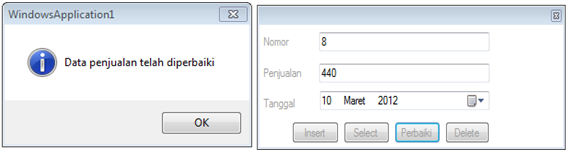
untuk perintah update tentunya anda harus tau terlebih mengetahui dahulu data yang ingin anda update, maka dari itu kita membutuhkan perintah select untuk mengetahui data yang ingin kita update, kita telah membuat perintah select sebelumnya maka kita panggil saja Button2_click atau Select_click
dan logika yang kita butuhkan
kita butuh klik dua kali pada button update klik pertama untuk perintah select atau mengetahui data mana yang anda ingin perbarui dan klik kedua eksekusi printah update anda lihat koding dibawah ini .
Code:
If Button3.Text = "Perbaiki" ThenDim Str As String = "Data Source=192.168.1.1\SQLEXPRESS;Initial Catalog=Contoh;
Dim cnt As New SqlClient.SqlConnection(Str)
Dim cmd As New SqlClient.SqlCommand
.CommandText = "Update grafik set Penjualan='" & TextBox2.Text & "',tanggal='" &
Format(DateTimePicker1.Value, "yyyy/MM/dd") & "' where nomor='" & TextBox1.Text & "'"
MsgBox("Data penjualan telah diperbaiki", MsgBoxStyle.Information)
DateTimePicker1.Value = Date.Now
MsgBox(ex.Message, MsgBoxStyle.Critical)
Code:
Button2_Click(sender, e)
Button3.Text = "Perbaiki"
 |
| Update |
Warna abu-abu itu logika pertama atau untuk mengupdate data dan logika kedua warna orange atau untuk select data yang ingin kita update. anda juga bisa menggunakan cara seperti boolean atau cara anda sendiri.
Untuk perintah delete pada database kasusnya sama seperti update, anda harus tau data yang anda ingin hapus, dan eksekusi perintah delete query seperti code dibawah ini untuk menghapus record data anda.
Code:
.CommandText = "delete grafik where nomor='" & TextBox1.Text & "'"
Untuk melihat data pada tabel tambahkan datagirdview pada toolbox anda dan ketik koding berikut ini.
Code:
        Dim Str As String = "Data Source=192.168.1.1\SQLEXPRESS;Initial Catalog=Contoh;
        User=admin;
        Pwd=1"
        DataGridView1.Visible = True
        Dim cnt As New SqlClient.SqlConnection(Str)
        Dim cmd As New SqlClient.SqlCommand
        Dim db As New SqlClient.SqlDataAdapter
        Dim ds As New DataSet
        cnt.Close()
        cnt.Open()
        With Cmd
            .Connection = cnt
            .CommandType = CommandType.Text
            .CommandText = "Select * From grafik order by Nomor asc"
            db = New SqlClient.SqlDataAdapter
            db.SelectCommand = cmd
            ds = New DataSet
            db.Fill(ds, "grafik")
            DataGridView1.DataSource = ds
            DataGridView1.DataMember = "grafik"
        End With
        cnt.Close()
 |
| datagirdview |