Showing posts with label SqlServer. Show all posts

Saturday, March 10, 2012

Creating a Report with Crystal Reports VB Net


This tutorial will help you to create a report with crystal report, we create ADO OLE DB as a connection string, to create a simple report with crystal report using  ADO OLE DB Connection string, follow the instructions, first we use sqlserver as a database and crystal report as our report. add your crystal report with right click on your current project properties > add  > new items then click and select reporting choose cystal report then ok.

Create crystal report a
and will show crystal reports gallery, choose "as a blank report" then ok, to select the connections string properties, right click the database fields in the field explorer located in your project left design and choose database expert.

Create crystal report b

microsoft provides many more available connections string, to hook up your sql server database with oledb(ado), create new connection > ole db (ado)  > make new connection > microsoft oledb provide for sql server.


create crystal report c

then click next to continue will show you to manage the connection string, fill the server name with your server connection, check the integrated securty if you connect using localhost, select the database that you want to select in the database field then click finish, ok now we have a connection string with provided connection by sql server, and we going to choose our table for crystal report design, choose the server name "192.168.1.1/sqlexpress"  > database > dbo > select your table by clicking the arrow, then click ok.


create crystal report d

now we have our current table,to put the field from the table in your crystal report design,choose the table, select field by using "drag and drop" you will get more tools design with right click in your report or from the toolbox on bottom left.
Cystral report design

ok now we take a look "windows form" in our project if you dont have it one right click on the current project, create with "add new" > "add windows form", create the same as the picture below by adding two datetimepicker,a button and a crystalreportviewer double click your button insert the code below.

Code:
        Dim Conn As New SqlClient.SqlConnection
        Dim Da As New SqlClient.SqlDataAdapter
        Dim ds As New DataSet
        Dim strConnection As String
        Dim SQL As New SqlClient.SqlCommand
        strConnection = "Data Source=192.168.1.1\SQLEXPRESS;Initial Catalog=Contoh; 
        User=admin; Pwd=1"
        Conn = New SqlClient.SqlConnection(strConnection)
        Conn.Open()
        SQL.Connection = Conn
        SQL.CommandText = "Select * From grafik Where tanggal between'" & 
        Format(DateTimePicker1.Value, "MM/dd/yyyy") & "' and '" &   
        Format(DateTimePicker2.Value, "MM/dd/yyyy") & "'order by Nomor asc "
        Da.SelectCommand = SQL
        Da.Fill(ds, "grafik")
        Dim a As New report 'your crystal report
        Dim b As New Reportform
        a.SetDataSource(ds.Tables!grafik) 'binding your cristal report to the datasource
        b.GroupBox1.Visible = False
        b.CrystalReportViewer1.Visible = True
        b.CrystalReportViewer1.ReportSource = a
  b.Refresh()
        b.WindowState = FormWindowState.Maximized
        b.Show()


form design

from the code I ask of the code to select between two date from the data in the table, the database relates with this article Insert,Save,Update dan Delete pada VB net

crystal report viewer
hope this article will help you.

sourcecode


Friday, March 9, 2012

Insert, Select, Update and Delete in VB.net db sqlserver


Form Penjualan


bagaimana mengeksekusi perintintah query sederhana seperti insert,update, delete dan select pada visual basic. net ??
disini saya menggunakan database sqlserver database dan table bisa di lihat pada artikel ini membuat database sederhana, buatlah project baru pada visual studio anda dan pada form buat tampilan  seperti tampilan gambar disamping,
jika anda telah selesai double click pada button insert copy paste kode berikut ini untuk perintah insert.

Code:
        Dim Str As String = "Data Source=192.168.1.1\SQLEXPRESS;Initial Catalog=Contoh;User=admin; Pwd=1"
        Try
            Dim cnt As New SqlClient.SqlConnection(Str) ' manambahkan connection string pada 
            client
            Dim cmd As New SqlClient.SqlCommand ' menambahkan printah query pada client yang   
            akan di eksekusi di database
            cnt.Close()
            cnt.Open()
            With cmd
                .Connection = cnt
                .CommandText = "insert into grafik (nomor, penjualan, tanggal) values('" &          
                 TextBox1.Text & "','" & TextBox2.Text & "','" & Format(DateTimePicker1.Value.Date,
                 "yyyy/MM/dd") & "')"
               .ExecuteNonQuery()
            End With
            cnt.Close()
            MsgBox("Data penjualan telah tersimpan", MsgBoxStyle.Information)
            TextBox1.Text = ""
            TextBox2.Text = ""
            DateTimePicker1.Value = Date.Now
            TextBox1.Focus()
        Catch ex As Exception
            MsgBox(ex.Message, MsgBoxStyle.Critical)
        End Try

Insert
untuk printah select, double click button select anda ketikan coding dibawah ini.

Code:
 
       Dim Str As String = "Data Source=192.168.1.1\SQLEXPRESS;Initial Catalog=Contoh;User=admin; Pwd=1"
        Dim cari As String
        cari = InputBox("masukan nomor yang anda cari ", "Konfirmasi")
        Try
            Dim cnt As New SqlClient.SqlConnection(Str)
            Dim cmd As New SqlClient.SqlCommand
            Dim read As SqlClient.SqlDataReader
            cnt.Close()
            cnt.Open()
            With cmd
                .Connection = cnt
                .CommandText = "select * from grafik where nomor ='" & cari.Trim & "'"
                read = cmd.ExecuteReader(CommandBehavior.SingleRow)
                If read.Read Then
                    TextBox1.Text = read.GetValue(0)
                    TextBox2.Text = read.GetString(1)
                    DateTimePicker1.Value = read.GetDateTime(2)
                Else
                    MsgBox("nomor tidak ada pada table grafik ", MsgBoxStyle.Information)
                End If
            End With
        Catch ex As Exception
            MsgBox(ex.Message, MsgBoxStyle.Critical)
        End Try
   
Select
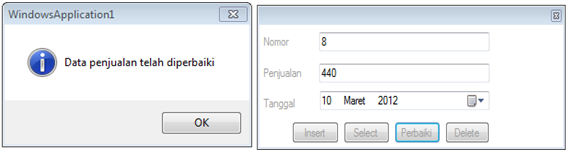
untuk perintah update tentunya anda harus tau terlebih mengetahui dahulu data yang ingin anda update, maka dari itu kita membutuhkan perintah select untuk mengetahui data yang ingin kita update, kita telah membuat perintah select sebelumnya maka kita panggil saja Button2_click atau Select_click
dan logika yang kita butuhkan
        kita butuh klik dua kali pada button update klik pertama untuk perintah select atau mengetahui data mana yang anda ingin perbarui dan klik kedua eksekusi printah update anda  lihat koding dibawah ini .

Code:
     If Button3.Text = "Perbaiki" ThenDim Str As String = "Data Source=192.168.1.1\SQLEXPRESS;Initial Catalog=Contoh; 
            User=admin; Pwd=1"
            Try
                Dim cnt As New SqlClient.SqlConnection(Str)
                Dim cmd As New SqlClient.SqlCommand
                cnt.Close()
                cnt.Open()
                With cmd
                    .Connection = cnt
                    .CommandText = "Update grafik set Penjualan='" & TextBox2.Text & "',tanggal='" & 
                     Format(DateTimePicker1.Value, "yyyy/MM/dd") & "' where nomor='" & TextBox1.Text & "'"
                    .ExecuteNonQuery()
                End With
                cnt.Close()
                MsgBox("Data penjualan telah diperbaiki", MsgBoxStyle.Information)
                TextBox1.Text = ""
                TextBox2.Text = ""
                DateTimePicker1.Value = Date.Now
                Button3.Text = "Update"
                TextBox1.Focus()
            Catch ex As Exception
                MsgBox(ex.Message, MsgBoxStyle.Critical)
            End Try
            Exit Sub
        End If

Code:
Button2_Click(sender, e)
Button3.Text = "Perbaiki"


Update
Warna abu-abu itu logika pertama atau untuk mengupdate data dan logika kedua warna orange  atau untuk select data yang ingin kita update. anda juga bisa menggunakan cara seperti boolean atau cara anda sendiri.


Untuk perintah delete pada database kasusnya sama seperti update, anda harus tau data yang anda ingin hapus, dan eksekusi perintah delete query seperti code dibawah ini untuk menghapus record data anda.
Code:
.CommandText = "delete grafik where nomor='" & TextBox1.Text & "'"

Untuk melihat data pada tabel tambahkan datagirdview pada toolbox anda dan ketik koding berikut ini.
Code:
        
        Dim Str As String = "Data Source=192.168.1.1\SQLEXPRESS;Initial Catalog=Contoh; 
        User=admin; 
        Pwd=1"
        DataGridView1.Visible = True
        Dim cnt As New SqlClient.SqlConnection(Str)
        Dim cmd As New SqlClient.SqlCommand
        Dim db As New SqlClient.SqlDataAdapter
        Dim ds As New DataSet
        cnt.Close()
        cnt.Open()
        With Cmd
            .Connection = cnt
            .CommandType = CommandType.Text
            .CommandText = "Select * From grafik order by Nomor asc"
            db = New SqlClient.SqlDataAdapter
            db.SelectCommand = cmd
            ds = New DataSet
            db.Fill(ds, "grafik")
            DataGridView1.DataSource = ds
            DataGridView1.DataMember = "grafik"
        End With
        cnt.Close()

datagirdview

Wednesday, March 7, 2012

Simple sql database and table in sql server

                                         
Create database pada sqlserver bagaimana ??
Ok disini saya menggunakan sqlserver 2005, dan silahkan click "Connect" pada database anda, mulailah untuk membuat Query baru, dan cobalah untuk membuat table yang ada perlukan untuk apalikasi kita. 

Selamat mencoba..

Ohh iyaa sqlserver nga case sensitive huruf besal atau kecil di anggapnya sama, silahkan membuat query baru dan ketikan baris query berikut ini.


Create database Contoh -- membuat database dengan nama contoh
Use contoh -- Semua eksekusi perintah sql akan diterapkan pada database contoh


create table grafik(
nomor int primary key,
Penjualan int,
tanggal datetime
)


insert into grafik values ('1','900','2012/03/01')
insert into grafik values ('2','200','2012/03/02')
insert into grafik values ('3','190','2012/03/03')
insert into grafik values ('4','100','2012/03/04')
insert into grafik values ('5','120','2012/03/05')
insert into grafik values ('6','150','2012/03/06')


select * from grafik
update grafik set penjualan='Naik' where tanggal='2012/03/08'
select top 8 penjualan  from grafik where tanggal between   '2012/03/01' and '2012/03/01'


Untuk menjalankan Query yang kita buat cukup di blok Seperti dilihat di gambar ini dan tekan F5.


dan anda dapat membuat perintah Query sederhana seperti Select, Update, Delete, Insert, dan peritah struktur lainnya seperti trigger ataupun store procedure.

Grafik VB.net menggunakan tool mschart


Grafik


Bagaimana cara membuat grafik pada aplikasi yang akan kita buat dengan berbasis client - server ??
semoga artikel ini dapat membantu anda bagaimana cara membuat membuat grafik  berbasis database.


Saya develop aplikasi ini menggunakan Visual studio 2008, Sebagai database saya menggunakan sqlserver untuk membuat tabel pada sql server, silahkan lihat ini membuat database sederhana. mulailah untuk membuat project baru pada Visual studio anda,
pada  file > new > new project > visual basic buatlah window form, pastikan toolbox telah teriinstal mschart, jika mschart belum terinstal pada visual studio anda, anda dapat mendownload nya disini MSchart.


setelah mschart terinstal lakukan langkah-langkah ini untuk menampilkan mschart di toolbox
klik kanan pada toolbox pilih choose items.. klik Browse  ke directory C:\Program Files\Microsoft Chart Controls\Assemblies pilih System.Windows.Forms.DataVisualization.dll kilk ok, Pastikan Chart tercentang lalu ok.
Toolbox chart

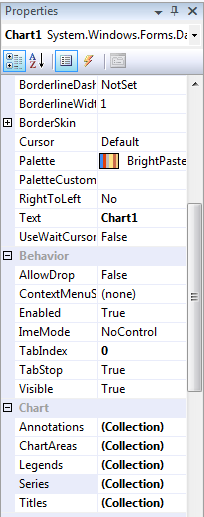
drag chart ke windows form atau double click, anda dapat menambahkan beberapa fitur-fitur yang ada pada propertis sesuai yang ingin anda tampilkan pada form nanti


Grafik Propertis

untuk Binding data dari database ke grafik, double click form anda, masukan koding berikut ini.

        Dim Str As String = "Data Source=192.168.1.1\SQLEXPRESS;Initial Catalog=Contoh; User=admin; Pwd=1" ' String koneksi database anda
        Try
            Dim cnt As New SqlClient.SqlConnection(Str) 
            Dim cmd As New SqlClient.SqlCommand
            cnt.Open()
            cmd.Connection = cnt
            Dim Comment As String = "SELECT top 5 Penjualan, tanggal FROM grafik "
            Dim da As New SqlClient.SqlDataAdapter(Comment, cnt)
            Dim ds As New DataSet()
            da.Fill(ds, "grafik")
            Chart1.Series("Series1").XValueMember = "tanggal"
            Chart1.Series("Series1").YValueMembers = "Penjualan"
            Chart1.DataSource = ds.Tables("grafik")
            cnt.Close()
        Catch ex As Exception
            MsgBox(ex.Message)
        End Try


dari perintah tersebut saya meminta pada database untuk menampilkan 5 teratas penjualan tertinggi untuk seluruh penjualan dari tanggal yang ada pada table grafik, pastikan database anda "tersimpan data" sehingga grafik dapat terlihat, database ini berkaitan dengan artikel yang dibuat sebelumnya membuat database sederhana untuk menyimpan data pada table sesuai dengan database yang anda ingin simpan anda dapat menyimpannya secara manual pada Query sql server atau melalui aplikasi seperti artikel berikut ini Insert,Save,Update dan Delete pada VB net.

sourcecode